AksharaCheckअक्षर जाँचಅಕ್ಷರ ಪರಿಶೀಲನೆ

Rendering report

Local test page

3 problems to fix, 6 things to check and 2 notes.

Checked in Chromium at phone (390 px) and desktop (1440 px) on 31 Oct 2026, 12:02 UTC. The page was served from 127.0.0.1:49205/index.html on the scanning computer, so that address only worked during the scan.

BharatCode qwen-3.8-27b explained 9 of the 9 findings to fix or check (6 model calls, 3,953 tokens, 1 min 39 s). 3 explanations come from an earlier run; their fixes were tested again in Chromium.

What was found

  1. FixBroken letters2 placesEdit the text
  2. FixWeb font did not load1 placeNeeds a developer
  3. CheckWrong language tag2 placesFix ready
  4. CheckOld non-Unicode font1 placeEdit the text
  5. CheckTwo languages without labels1 placeEdit the text
  6. CheckText runs off the screen on phones1 placeFix ready
  7. CheckLetters may be cut off1 placeFix ready
  8. NoteFont family names differ1 placeTake a look
  9. NoteUnusually tight line spacing1 placeTake a look
Fix
Readers see broken text. Start here.
Check
Likely wrong. Check the screenshot.
Note
Worth knowing. Often fine as it is.

To fix 3

Broken letters 2 places

A vowel sign, nukta or virama has no letter to attach to, so browsers draw it on a dotted circle.

FixSeen on phone and desktop

On the page

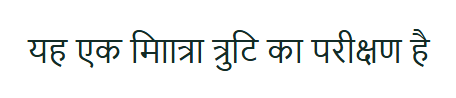
यह एक मााित्रा त्रुटि का परीक्षण है

  • माािA vowel sign with no letter before itU+092E U+093E U+093E U+093F
The element as Chromium drew it
How Chromium drew it at 390 px

What BharatCode says

This Devanagari text contains broken character sequences that render as strange, malformed letters. Please fix the underlying text by removing the stray vowel signs so each vowel follows its consonant.

इस हिंदी टेक्स्ट में गलत अक्षर संयोजन हैं जिससे शब्द बिगड़े हुए दिख रहे हैं, कृपया इसे सही करें।

ಈ ಹಿಂದಿ ಪಠ್ಯದಲ್ಲಿ ತಪ್ಪು ಅಕ್ಷರ ಸಂಯೋಜನೆಗಳಿವೆ, ದಯವಿಟ್ಟು ಸರಿಪಡಿಸಿ.

What to change

Correct the text itself. This is a typing or conversion mistake, so CSS cannot repair it.

Technical details
Page
http://127.0.0.1:49205/index.html
Checked at
phone (390 px) and desktop (1440 px)
{
  "invalid_sequences": [
    {
      "position": 8,
      "sequence": "माा",
      "codepoints": [
        "U+092E",
        "U+093E",
        "U+093E"
      ],
      "reason": "dependent vowel sign without a preceding consonant"
    },
    {
      "position": 9,
      "sequence": "ााि",
      "codepoints": [
        "U+093E",
        "U+093E",
        "U+093F"
      ],
      "reason": "dependent vowel sign without a preceding consonant"
    }
  ]
}

FixSeen on phone and desktop

On the page

ಇದು ಕಾಿ ತಪ್ಪಾದ ಗುರುತುಗಳ ಪರೀಕ್ಷೆ

  • ಕಾಿA vowel sign with no letter before itU+0C95 U+0CBE U+0CBF
The element as Chromium drew it
How Chromium drew it at 390 px

What BharatCode says

The Kannada text has a stray vowel mark with no consonant to attach to, making the word unreadable. Fix the typo by either removing the extra mark or restoring the missing consonant, and check the text in Kannada script.

कन्नड़ पाठ में एक अतिरिक्त स्वर चिह्न है जिसे हटाना या उसके आगे सही व्यंजन जोड़ना चाहिए।

ಕನ್ನಡ ಪಠ್ಯದಲ್ಲಿ ಅನಗತ್ಯ ಸ್ವರ ಚಿಹ್ನೆ ಇದೆ, ಅದನ್ನು ತೆಗೆದುಹಾಕಿ ಅಥವಾ ಸರಿಯಾದ ವ್ಯಂಜನವನ್ನು ಸೇರಿಸಿ.

What to change

Correct the text itself. This is a typing or conversion mistake, so CSS cannot repair it.

Technical details
Page
http://127.0.0.1:49205/index.html
Checked at
phone (390 px) and desktop (1440 px)
{
  "invalid_sequences": [
    {
      "position": 6,
      "sequence": "ಕಾಿ",
      "codepoints": [
        "U+0C95",
        "U+0CBE",
        "U+0CBF"
      ],
      "reason": "dependent vowel sign without a preceding consonant"
    }
  ]
}

Web font did not load

The browser could not download a font the page asked for.

FixSeen on phone and desktop

On the page

http://127.0.0.1:49205/fonts/does-not-exist.woff2

The font file returned HTTP 404.

What BharatCode says

A custom font file the page tries to load is missing, so the browser falls back to a default font. Either fix the font path so it points to a file that exists, or remove the font reference so the page uses its default typeface.

पेज पर इस्तेमाल होने वाला कस्टम फ़ॉन्ट फ़ाइल मौजूद नहीं है, इसलिए या तो फ़ाइल का सही पता लगाएँ या फ़ॉन्ट को हटा दें।

ಪುಟದಲ್ಲಿ ಬಳಸಲಾಗುತ್ತಿರುವ ಕಸ್ಟಮ್ ಫಾಂಟ್ ಕಡತ ಲಭ್ಯವಿಲ್ಲ, ಆದ್ದರಿಂದ ಫಾಂಟ್ ವಿಳಾಸವನ್ನು ಸರಿಪಡಿಸಿ ಅಥವಾ ಅದನ್ನು ತೆಗೆದುಹಾಕಿ.

What to change

Check the font address, and whether that font is actually used for visible text.

Technical details
Page
http://127.0.0.1:49205/index.html
Checked at
phone (390 px) and desktop (1440 px)
{
  "font_url": "http://127.0.0.1:49205/fonts/does-not-exist.woff2",
  "status": 404
}

To check 6

Wrong language tag 2 places

The text inherits or declares a tag for another language. Many affected elements can share one parent language-tag problem.

CheckSeen on phone and desktop

On the page

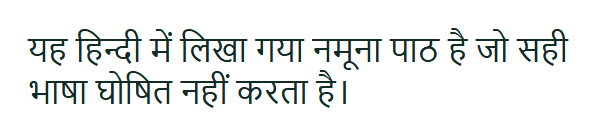
यह हिन्दी में लिखा गया नमूना पाठ है जो सही भाषा घोषित नहीं करता है।

Tagged as English (en), but written in Devanagari.

The element as Chromium drew it
How Chromium drew it at 390 px

What BharatCode says

The page shows Hindi text but is set to display in English. Change the language setting to Hindi so the text is read correctly.

पेज पर हिंदी लिखा हुआ है, इसलिए भाषा सेटिंग हिंदी की करनी चाहिए।

ಟ್ರೆಲ್ಲಿನಲ್ಲಿ ಹಿಂದಿ ಲಿಖಿತವಿದೆ, ಆದ್ದರಿಂದ ಭಾಷೆ ಸೆಟ್ಟಿಂಗ್ ಅನ್ನು ಹಿಂದಿಗೆ ಬದಲಾಯಿಸಬೇಕು.

Fix ready, tested in Chromium at 390 px

Add this attribute to the element, so browsers and screen readers treat the text as Hindi.

lang="hi"
Technical details
Page
http://127.0.0.1:49205/index.html
Checked at
phone (390 px) and desktop (1440 px)
{
  "script": "devanagari",
  "effective": "en",
  "allowed_languages": [
    "awa",
    "bho",
    "brx",
    "doi",
    "hi",
    "kok",
    "mag",
    "mai",
    "mr",
    "ne",
    "new",
    "sa",
    "sd"
  ],
  "share": 1.0
}

CheckSeen on phone and desktop

On the page

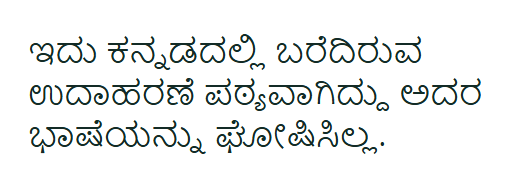
ಇದು ಕನ್ನಡದಲ್ಲಿ ಬರೆದಿರುವ ಉದಾಹರಣೆ ಪಠ್ಯವಾಗಿದ್ದು ಅದರ ಭಾಷೆಯನ್ನು ಘೋಷಿಸಿಲ್ಲ.

Tagged as English (en), but written in Kannada.

The element as Chromium drew it
How Chromium drew it at 390 px

What BharatCode says

This text is written in Kannada, but the page tells the browser it is English. Set the language of this text to Kannada so screen readers pronounce it correctly.

यह पाठ कन्नड़ में लिखा है, इसलिए इसकी भाषा कन्नड़ सेट करें।

ಈ ಪಠ್ಯ ಕನ್ನಡದಲ್ಲಿ ಬರೆದಿದೆ, ಆದ್ದರಿಂದ ಅದರ ಭಾಷೆಯನ್ನು ಕನ್ನಡಕ್ಕೆ ಹೊಂದಿಸಿ.

Fix ready, tested in Chromium at 390 px

Add this attribute to the element, so browsers and screen readers treat the text as Kannada.

lang="kn"
Technical details
Page
http://127.0.0.1:49205/index.html
Checked at
phone (390 px) and desktop (1440 px)
{
  "script": "kannada",
  "effective": "en",
  "allowed_languages": [
    "btk",
    "kn",
    "kok",
    "sa",
    "tcy"
  ],
  "share": 0.98
}

Old non-Unicode font

The text looks like Latin letters shown through a legacy Indic font, which search, copy and screen readers cannot read.

CheckSeen on phone and desktopConfirm with the screenshot

On the page

Hkkjr ds yksx Hkk"kk dk vknj djrs gSa

Font used: KrutiDev 010.

The element as Chromium drew it
How Chromium drew it at 390 px

What BharatCode says

This text uses an old KrutiDev font that won't display properly on modern browsers. Switch it to a proper Devanagari font like Noto Sans Devanagari instead.

पुराने कृतिदेव फ़ॉन्ट को नोटो सान्स देवनागरी से बदलें।

ಹಳೆಯ ಕೃತಿದೇವ ಫಾಂಟ್ ಅನ್ನು ನೋಟೋ ಸ್ಯಾನ್ಸ್ ದೇವನಾಗರಿ ಬದಲಿಸಿ.

What to change

Convert the text to Unicode and use a Unicode font.

Technical details
Page
http://127.0.0.1:49205/index.html
Checked at
phone (390 px) and desktop (1440 px)
{
  "computed_font": "\"KrutiDev 010\", serif",
  "note": "Legacy font with Latin-encoded content; verify encoding manually"
}

Two languages without labels

Hindi and Kannada sit in one element with one language tag.

CheckSeen on phone and desktop

On the page

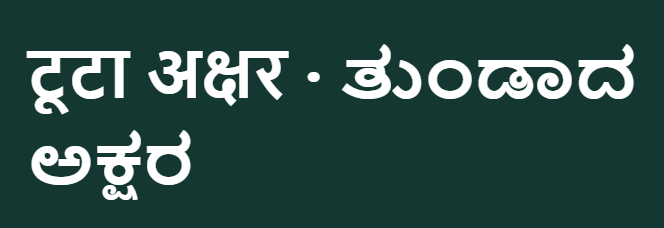
टूटा अक्षर · ತುಂಡಾದ ಅಕ್ಷರ

One element mixes Devanagari (9 letters) and Kannada (11 letters) under the tag English (en).

The element as Chromium drew it
How Chromium drew it at 390 px

What BharatCode says

The text mixes Hindi and Kannada letters without telling the browser which language each part is, so the wrong font may be used. Add a language attribute so each script gets the correct rendering.

इस टेक्स्ट में हिंदी और कन्नड़ अक्षर मिले हुए हैं, इसलिए हर भाग के लिए भाषा बतानी चाहिए।

ಈ ಪಠ್ಯದಲ್ಲಿ ದೇವನಾಗರಿ ಮತ್ತು ಕನ್ನಡ ಅಕ್ಷರಗಳು ಮಿಶ್ರಿತವಾಗಿದ್ದು, ಪ್ರತಿ ಭಾಗಕ್ಕೂ ಸರಿಯಾದ ಭಾಷಾ ಗುರುತನ್ನು ಹೊಂದಿರಬೇಕು।

What to change

Wrap each language in its own element with the matching lang attribute.

Technical details
Page
http://127.0.0.1:49205/index.html
Checked at
phone (390 px) and desktop (1440 px)
{
  "scripts": {
    "devanagari": 9,
    "kannada": 11
  },
  "effective": "en",
  "suggestion": "Wrap each language run in a span with its own lang attribute"
}

Text runs off the screen on phones

A line is wider than the space it has at phone width.

CheckSeen on phone

On the page

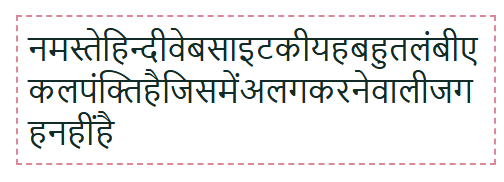
नमस्तेहिन्दीवेबसाइटकीयहबहुतलंबीएकलपंक्तिहैजिसमेंअलगकरनेवालीजगहनहींहै

At phone width the line runs 257 px past its box.

The element as Chromium drew it
Before the fix
The element after the fix
After the fix

What BharatCode says

This line of Hindi text is much wider than the screen, so it runs off the side instead of wrapping. Allow the text to break onto the next line so it fits within the visible area.

यह हिन्दी पंक्ति स्क्रीन से चौड़ी है, इसलिए इसे लपेटने की अनुमति दें।

ಈ ಹಿಂದಿ ಪಂಕ್ತಿ ಪರದೆಗಿಂತ ಅಗಲವಾಗಿದೆ, ಆದ್ದರಿಂದ ಅದನ್ನು ಸುತ್ತಿಕೊಳ್ಳಲು ಬಿಡಿ.

Fix ready, tested in Chromium at 390 px

Ask your developer to add this CSS to the element. With it the whole text shows, at full size.

word-break: break-all;
max-width: 100%;
overflow-wrap: anywhere;
white-space: normal;
BharatCode tried 2 repairs. Chromium rejected 1 before one passed.
  1. overflow-wrap: anywhere; word-break: break-word; max-width: 100%;Rejected: Original issue still present
  2. word-break: break-all; max-width: 100%; overflow-wrap: anywhere; white-space: normal;Passed
Technical details
Page
http://127.0.0.1:49205/index.html
Checked at
phone (390 px)
{
  "scroll_width": 495.0,
  "client_width": 238.0,
  "overflow_x": "visible"
}

Letters may be cut off

The text is taller than the box that shows it, so marks above or below the line can disappear.

CheckSeen on phone and desktopConfirm with the screenshot

On the page

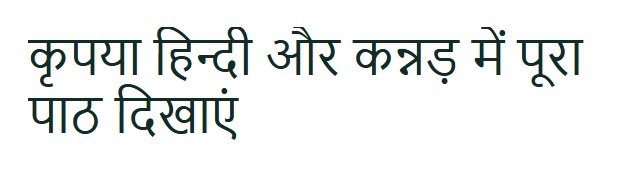
कृपया हिन्दी और कन्नड़ में पूरा पाठ दिखाएं

The text needs 41 px more height than its box gives it.

The element as Chromium drew it
Before the fix
The element after the fix
After the fix

What BharatCode says

The text is taller than its box, so part of it is being cut off. Increase the height or line-height so the whole text fits.

पाठ बॉक्स से ऊँचा है और आधा कट रहा है, इसलिए बॉक्स की ऊँचाई बढ़ाएँ।

ಪಠ್ಯವು ಪೆಟ್ಟಿಗೆಗಿಂತ ಎತ್ತರವಾಗಿ ಕತ್ತರಿಸಲ್ಪಡುತ್ತಿದೆ, ಪೆಟ್ಟಿಗೆಯ ಎತ್ತರವನ್ನು ಹೆಚ್ಚಿಸಿ।

Fix ready, tested in Chromium at 390 px

Ask your developer to add this CSS to the element. With it the whole text shows, at full size.

min-height: auto;
height: auto;
Technical details
Page
http://127.0.0.1:49205/index.html
Checked at
phone (390 px) and desktop (1440 px)
{
  "scroll_height": 59.0,
  "client_height": 18.0,
  "overflow_pixels": 41.0,
  "note": "Potential content clipping. Verify the screenshot before changing CSS."
}
Notes 2

Font family names differ

The CSS font name and Chromium's internal rendered font name differ. Web-font aliases can legitimately have different names.

NoteSeen on phone and desktop

On the page

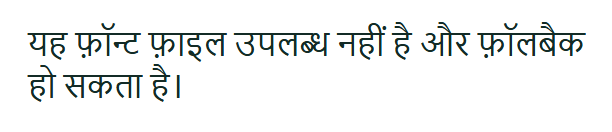
यह फ़ॉन्ट फ़ाइल उपलब्ध नहीं है और फ़ॉलबैक हो सकता है।

The page asked for brokenlocal, but Chromium drew this text with Times New Roman and Nirmala UI.

The element as Chromium drew it
How Chromium drew it at 390 px

What to change

Compare the text visually before changing fonts; an internal name difference alone does not prove a rendering problem.

Technical details
Page
http://127.0.0.1:49205/index.html
Checked at
phone (390 px) and desktop (1440 px)
{
  "requested": "brokenlocal",
  "actual": [
    {
      "familyName": "Times New Roman",
      "postScriptName": "TimesNewRomanPSMT",
      "isCustomFont": false,
      "glyphCount": 9
    },
    {
      "familyName": "Nirmala UI",
      "postScriptName": "NirmalaUI",
      "isCustomFont": false,
      "glyphCount": 36
    }
  ],
  "note": "Fallback is not always a rendering defect"
}

Unusually tight line spacing

Multiple lines have unusually little vertical separation. This is a review cue, not proof that letters are clipped.

NoteSeen on phone and desktop

On the page

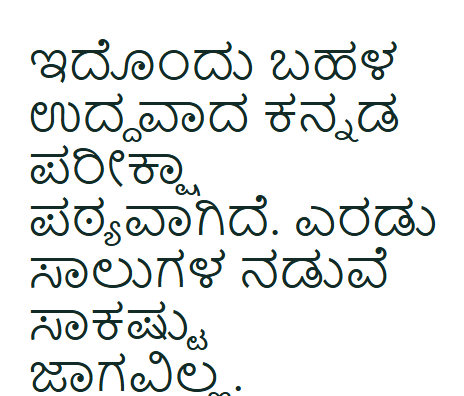
ಇದೊಂದು ಬಹಳ ಉದ್ದವಾದ ಕನ್ನಡ ಪರೀಕ್ಷಾ ಪಠ್ಯವಾಗಿದೆ. ಎರಡು ಸಾಲುಗಳ ನಡುವೆ ಸಾಕಷ್ಟು ಜಾಗವಿಲ್ಲ.

Line height is 1.08 times the font size.

The element as Chromium drew it
How Chromium drew it at 390 px

What to change

Inspect the text at normal zoom. Increase line height only if marks actually overlap or become difficult to read.

Technical details
Page
http://127.0.0.1:49205/index.html
Checked at
phone (390 px) and desktop (1440 px)
{
  "font_size": 24.0,
  "line_height": 26.0,
  "ratio": 1.08
}